
Key Takeaways
- Splashtop ranks first, combining easy setup, strong security, and fair pricing for teams of any size.
- Modern businesses need tools that fit hybrid and BYOD work, not just office desktops.
- Cloud-first options deploy in minutes without dedicated IT, while self-hosted tools trade effort for control.
- Security still comes first: look for strong encryption and multi-factor authentication on every option.
- Match the tool to how your team works before comparing features or price.
Work looks nothing like it did a few years ago, and the tools that connect teams to their machines have to keep up. A modern business needs remote access that a non-technical team can set up in minutes, that secures every session, and that works just as well for a hybrid employee at home as for someone on a personal laptop.
The leading remote access solution software options below are compared on exactly those terms, and Splashtop comes out ahead by balancing simplicity, security, and value better than any single rival.
The shift toward flexible work is what makes this category essential.
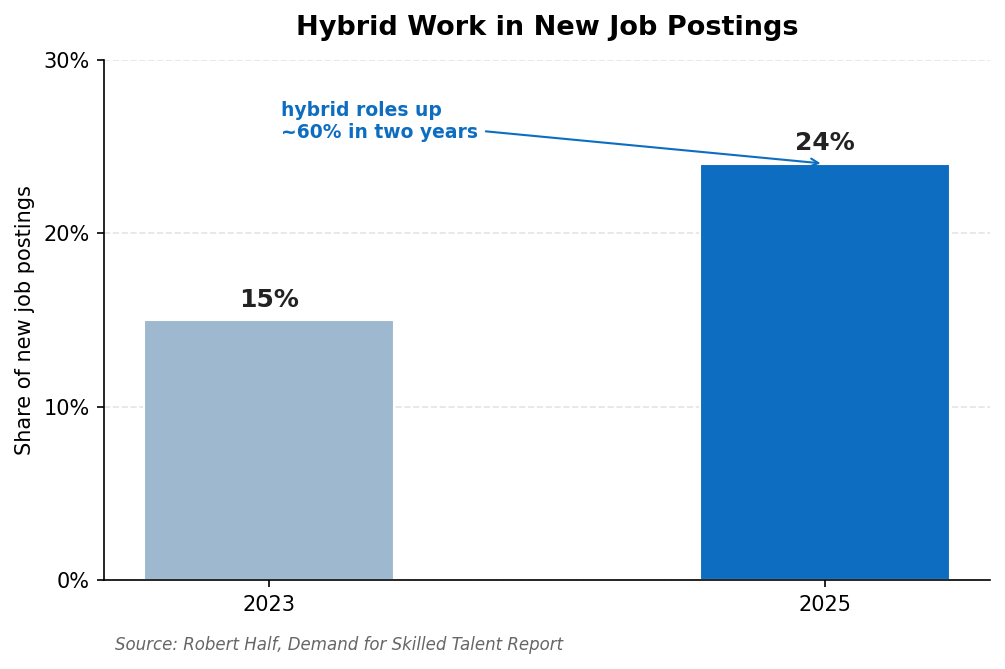
As hybrid roles become the norm, businesses need reliable ways to connect distributed teams to their systems. Source: Robert Half, Demand for Skilled Talent Report.
With the rise of hybrid work now a permanent feature of the modern workplace, secure remote access has moved from a nice-to-have to a core part of how businesses operate.
How These Options Were Compared
Five criteria shaped this comparison, each reflecting how modern teams actually work.
- Ease of deployment and use: How quickly a non-technical team can get running, ideally in minutes without IT help.
- Security: Strong encryption, multi-factor authentication, and sensible access controls on every session.
- Flexibility: Support for hybrid schedules, cross-platform devices, and bring your own device (BYOD) setups that are now standard.
- Performance: Responsive, stable sessions that hold up for everyday work.
- Value: Pricing that fits a modern budget, with free or low-cost tiers where possible.
Comparison at a Glance
|
Tool |
Setup |
Security |
Best For |
|
1. Splashtop |
Minutes, no IT |
AES-256, MFA |
Most modern teams |
|
2. AnyViewer |
Quick, free tier |
ECC encryption |
Simple Windows access |
|
3. RemotePC |
Browser or app |
AES-256, 2FA |
Cloud-first small teams |
|
4. Getscreen.me |
Browser, agentless |
AES-128 over WebRTC |
Instant browser access |
|
5. Iperius Remote |
Lightweight |
TLS 1.3, 2FA |
Budget-conscious teams |
The 5 Leading Remote Access Options in 2026
1. Splashtop – The Best All-Around Choice for Modern Teams
Splashtop fits the modern workplace on every measure. Setup takes minutes with no IT team required, yet security is enterprise-grade: every session runs over TLS with 256-bit AES encryption, multi-factor authentication, device verification, single sign-on, and role-based access, and the platform holds SOC 2 Type II and ISO 27001 certifications with HIPAA and GDPR support.
It works across Windows, Mac, Linux, iOS, Android, and Chromebooks, so hybrid and personal-device setups are covered, and sessions stream at up to 4K with low latency for responsive everyday work.
Pricing starts around $5 per month for solo use and roughly $8.25 per user monthly for teams, and more than 30 million users rely on it, including organizations in 85% of the Fortune 500.
For businesses weighing the leading remote access solution software for a flexible workforce, Splashtop is the most balanced choice, and a free trial is available on Splashtop’s site.
“I use Splashtop to manage and support around 10 computers across three different organisations, and overall it has been very reliable.” Verified User, Gartner Peer Insights (Splashtop holds a 4.8/5 rating)
Pros:
- Sets up in minutes without IT help
- AES-256 encryption, MFA, SSO, and certifications
- Cross-platform support for hybrid and personal devices
- Strong value with transparent pricing
Cons:
- Not a full virtual desktop infrastructure platform
- No built-in voice chat during sessions
Best for: Modern teams that want the best mix of ease, security, and value.
Contact: Website: https://www.splashtop.com HQ: Cupertino, California, USA
2. AnyViewer – Simple Access With a Free Tier
AnyViewer is a straightforward tool built mainly for Windows, with a free tier that makes it easy to start. It offers ECC-encrypted sessions, one-click connections to assigned devices, and fast file transfer, plus mobile viewer apps for iOS and Android. For a small modern team that works primarily on Windows and wants something simple, it is an approachable option, though its cross-platform depth is lighter than the tools above.
Pros:
- Free tier and budget-friendly plans
- Simple one-click connections
- Fast file transfer
Cons:
- Windows-centric, with limited Mac support
- Fewer admin controls for larger teams
Best for: Small teams that work mainly on Windows and want simplicity.
Contact: Website: https://www.anyviewer.com
3. RemotePC – Cloud-First Access for Small Teams
RemotePC, from IDrive, is a cloud-based tool that lets you connect from a web browser without installing anything, which suits a modern team that works across many devices. Sessions are secured with TLS and AES-256, a per-computer Personal Key, and two-step verification, and its Performance Viewer streams at up to 60fps for crisp visuals. Affordable annual plans make it appealing for small businesses that want flexibility without a big commitment.
Pros:
- Browser-based access with no install
- AES-256 encryption and two-step verification
- Low-cost annual plans
Cons:
- Some advanced features are Windows-only
- Add-ons can raise the total cost
Best for: Cloud-first small teams watching their budget.
Contact: Website: https://www.remotepc.com
4. Getscreen.me – Instant Access Straight From the Browser
Getscreen.me takes the cloud-first idea furthest, letting you connect to a device through a browser with no client to install, which is ideal for quick support and ad-hoc access. It runs across Windows, Mac, Linux, and Android, offers two-factor authentication, IP whitelisting, session recording, and a self-hosted option for more control. One honest caveat: it encrypts sessions with 128-bit AES over WebRTC and SSL rather than the 256-bit standard some rivals use, and there is no iOS app.
Pros:
- Agentless, browser-based instant access
- 2FA, IP whitelisting, and session recording
- Self-hosted option and a free non-commercial tier
Cons:
- AES-128 rather than AES-256 encryption
- No iOS app
Best for: Teams that want instant, install-free access from any browser.
Contact: Website: https://www.getscreen.me
5. Iperius Remote – Affordable and Secure for Small Businesses
Iperius Remote, built by an Italian developer, is the value pick. It is genuinely free for personal use with no time limits, and paid plans start around €8 per month based on concurrent connections, with unlimited devices on every tier.
Despite the low price, security is strong: end-to-end encryption over TLS 1.2 and 1.3, two-factor authentication, and GDPR and HIPAA compliance on ISO 27001-certified infrastructure. It is lightweight and cross-platform, with smaller brand recognition than the bigger names.
Pros:
- Free personal tier and affordable paid plans
- End-to-end TLS 1.3 encryption with 2FA
- GDPR and HIPAA compliant
Cons:
- Smaller community and fewer integrations
- Occasional connection instability reported
Best for: Budget-conscious small businesses that still want strong security.
Contact: Website: https://www.iperius.com
Decision Guide: Which One Fits You
Match your situation to the right tool:
- Choose Splashtop if you want the best overall balance of ease, security, and value for a hybrid team of any size.
- Choose AnyViewer if your team is mostly on Windows and you want a simple, low-cost starting point.
- Choose RemotePC if you prefer cloud-first, browser-based access on a small-business budget.
- Choose Getscreen.me if instant, install-free access from a browser matters more than top-tier encryption.
- Choose Iperius Remote if you want strong security at the lowest possible cost.
FAQs
What should modern businesses look for in remote access software? Prioritize quick, no-IT setup, strong encryption and MFA, support for hybrid and personal-device work across platforms, and pricing that fits your budget. Modern teams value tools that just work for distributed staff without adding administrative weight, so ease and flexibility matter as much as raw features.
How does remote access software support hybrid and BYOD work? It lets employees reach their work machines from home, the office, or a personal device, which is exactly what hybrid and BYOD setups require. The best tools run across desktop and mobile platforms, and protect every session with encryption and MFA so personal devices do not become a weak point.
Is cloud-based or self-hosted remote access better for a modern business? Cloud-based tools are faster to deploy and need no infrastructure, which suits most modern teams, while self-hosted options give you more control over data and are worth considering if you have specific compliance needs and the in-house skills to manage them. The right choice depends on your resources and requirements.
Why does Splashtop rank first for modern businesses? Splashtop combines minutes-long setup with AES-256 encryption, multi-factor authentication, and certifications, full cross-platform support for hybrid and BYOD teams, and transparent pricing from around $5 per month. That balance of ease, security, and value fits how modern businesses operate.
Can Splashtop support a hybrid team across different devices? Yes. Splashtop runs on all major desktop and mobile platforms and is designed for work from anywhere, with centralized administration that lets a small team manage access without dedicated IT staff.
The Bottom Line
Among the leading remote access solution software options compared for modern businesses, Splashtop comes out ahead by pairing easy, no-IT setup with strong security, full cross-platform support, and fair pricing. AnyViewer keeps Windows access simple, RemotePC delivers cloud-first convenience, Getscreen.me offers instant browser access, and Iperius Remote provides secure access at the lowest cost. Decide how your team actually works, trial the options that fit, and confirm their security before you roll one out.
